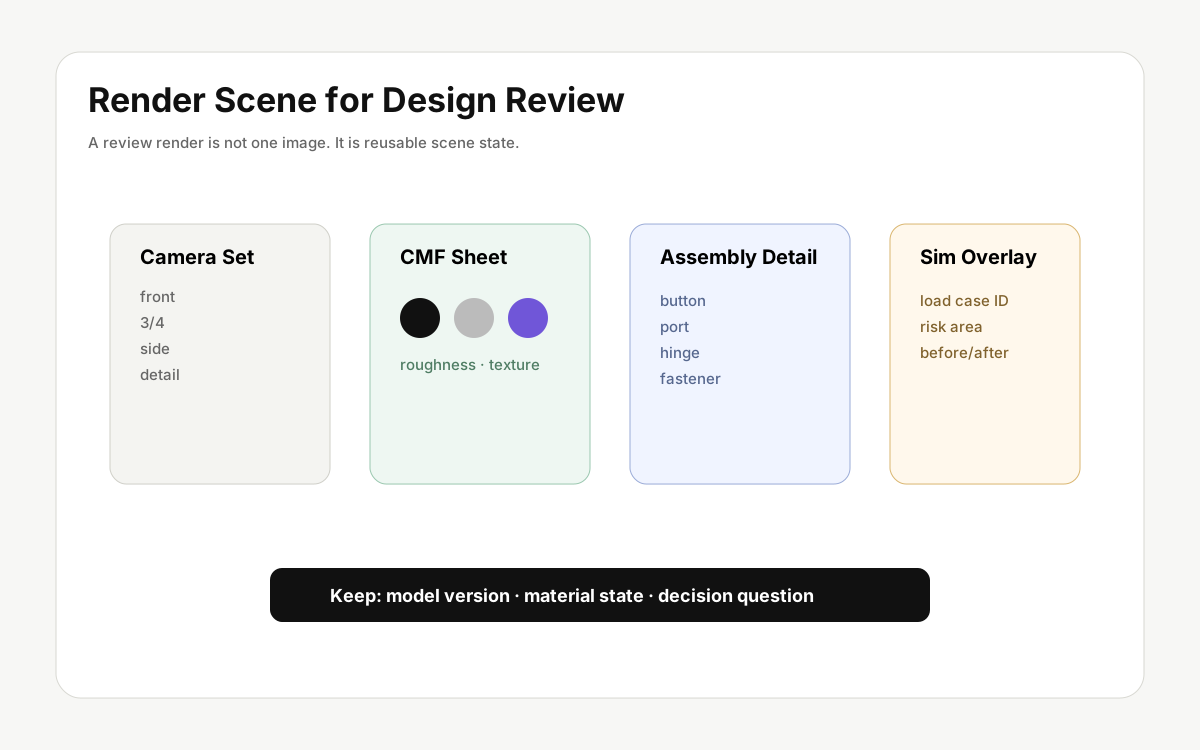
Advertising imagery creates one strong impression. Design review render scenes need to support decisions: part structure, material candidates, surface quality, assembly gaps, and use context need to be comparable.
For review, the important asset is not only the exported image. It is the editable scene state: camera, lighting, material, background, model version, and the question the team is trying to answer.
Advertising and review scenes have different jobs
An advertising image can use dramatic lighting, deep shadows, and emotional background context. A review image should help the team inspect shape, proportion, CMF direction, surface transitions, and product intent. It can be calmer and more neutral because the goal is judgment, not impression.
Lock camera sets early
If the camera changes every time, teams cannot separate design difference from viewpoint difference. Front, three-quarter, side, and detail views create a stable comparison set.
- Front: proportion, silhouette, interface layout.
- Three-quarter: volume, edge quality, surface flow.
- Side: thickness, protrusion, hand feel.
- Detail: buttons, ports, hinge areas, fasteners, surface transitions.
Keep material candidates editable
Matte black, brushed metal, and translucent plastic should not survive only as exported images. Lighting, reflection, roughness, texture, and color need to remain part of the scene state.
This matters in CMF review because the same color can look very different depending on surface roughness and lighting. A material candidate is not just a color label.
Make comparison outputs
Consistent camera, light, and background let the team discuss surface and proportion rather than image style. A/B/C material sheets, fixed-angle candidate comparisons, and studio-versus-use-context outputs are often more useful than one hero render.
Connect model version and feedback
Render feedback can drift away from the CAD model. A useful review scene should preserve model version, major changes, and the decision question. A name like “v03, side button reduced 0.8 mm, matte material candidates 1-2” keeps context alive after the meeting.
Useful review outputs
- Comparison images from three or four fixed cameras.
- Material candidates under the same lighting.
- One studio scene and one use-context scene.
- A short turntable or rotation preview.
- A shareable scene with model version, materials, and unresolved questions.
RHXY Render aims to turn 3D/CAD models into material, lighting, camera, image, video, turntable, and shareable scene workflows where each output can feed the next review.